Open-source AI agent · by zhayujie

CowAgent is theAI agent that plans,acts and remembers

An open-source assistant and agent harness that lives in your chat apps. Messages arrive from the web console, WeChat, Feishu or Telegram; the agent works through memory, tools and skills; your chosen model writes the reply.

  • MIT licence
  • Desktop Windows · macOS
  • Console :9899
01 Channels → agent → reply
Messages from chat channels flowing into CowAgent Messages from the web console, WeChat, Feishu and Telegram flow into the Agent Core, which works with your chosen model and sends a reply back through the same channel. Web console WeChat Feishu / Lark Telegram your model Agent Core Reply same channel text · image · voice · file
02 Long-term memory
CowAgent's three-tier memory with nightly Deep Dream distillation Contextshort-term Daily memorymid-term MEMORY.mdlong-term Deep Dream

What is CowAgent

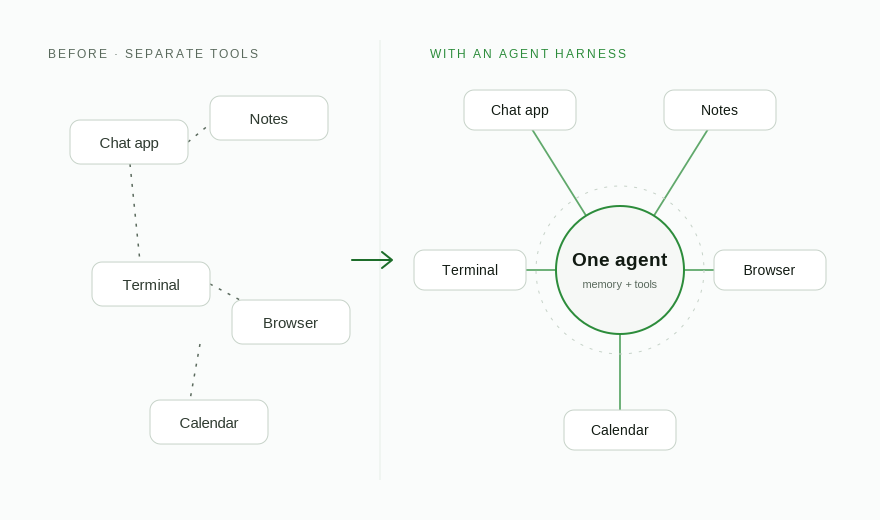
One agent between your chats, your tools and your models

CowAgent began as chatgpt-on-wechat, a bridge between chat apps and language models. It has grown into a full agent harness that runs 24/7 on your own computer or server.

Instead of answering one message at a time, it can plan a task, run commands, read and write files, browse the web, schedule work and remember what you told it last week, then reply wherever you started the conversation.

Diagram comparing separate, disconnected tools with a single CowAgent agent hub connecting chat, notes, terminal, browser and calendar
The problem

Assistants that forget and cannot act

A plain chatbot loses context between sessions and stops at text, so real tasks stay scattered across apps, notes and terminals.

The outcome

An assistant with memory and hands

One agent keeps long-term memory, uses tools and skills, and answers through the channel you started in.

Features

Eight capabilities, one connected core

Every capability plugs into the same Agent Core, so memory informs planning, skills reuse tools and any channel can reach any model.

01

Plans the task, then sees it through

CowAgent breaks a complex request into steps and keeps calling tools until the goal is met. Build a team of agents, each with its own role, model, skills and knowledge, and let them hand work to each other in one conversation.

  1. Search the web for sourcesweb_search
  2. Summarise into a report filewrite
  3. Schedule a Monday follow-upscheduler
Multi-agent teams: researcher, writer, editor
02

Three-tier memory

Context, daily memory and a long-term MEMORY.md, searched by keyword and vector.

Contextshort-term
Daily memorymid-term
MEMORY.mdlong-term

Deep Dream distils notes nightly

03

Many channels

One instance serves the web console and chat apps in parallel.

  • Web
  • WeChat
  • Feishu
  • DingTalk
  • Slack
  • +7
04

Swap models

Chat, vision, image, speech and embeddings can each use a different vendor.

  • Claude
  • DeepSeek
  • GPT
  • Qwen
  • +9
05

Installable skills

Previewed before install, or written for you with skill-creator.

Cow Skill HubGitHubClawHub
06

Built-in tools and MCP

Atomic tools the agent calls on its own, plus any MCP server over stdio, SSE or Streamable HTTP.

  • read
  • write
  • edit
  • bash
  • browser
  • scheduler
  • web_search
  • web_fetch
  • vision
  • memory
  • MCP
07

Knowledge base

A topic-based Markdown wiki with a knowledge-graph view.

08

Self-evolution

The agent reviews past conversations and grows with everyday use.

  1. Review conversations
  2. Improve skills
  3. Follow up on open tasks
  4. Consolidate memory

How it works

From message to reply in four stages

CowAgent is built as a harness: messages flow in through channels, the Agent Core plans and reasons, and the model writes the response that travels back.

  1. 01Input

    Message in

    A message, image, voice note or file arrives from the web console, the desktop app or a connected chat app.

  2. 02Plan

    Plan and recall

    The Agent Core breaks the request into steps and pulls in relevant memory and knowledge-base entries.

  3. 03Act

    Act with tools

    It calls built-in tools, MCP servers or skills, checks each result and loops until the job is done.

  4. 04Output

    Reply out

    Your configured model writes the response, which goes back through the channel the message came from.

Each layer is decoupled, so you can swap a model provider, add a channel or install a skill without rebuilding the rest of your setup.

Compatibility

Platforms, channels and model providers

Drawn from the project's README. Platform support depends on the install route; channels and providers are configured from the console.

“Not listed” means the route is not documented for that platform, not that it is impossible.
Platform Desktop client One-line installer Docker From source
Windows Yes PowerShell Yes Python
macOS Yes bash Yes Python
Linux Not listed bash Yes Python
Linux server / VPS Not listed bash Yes Python

Channels 12

  • Web console
  • WeChat
  • Feishu / Lark
  • DingTalk
  • WeCom Bot
  • WeCom App
  • QQ
  • Telegram
  • Slack
  • Discord
  • WeChat Customer Service
  • WeChat Official Account

Model providers 13

  • Claude
  • OpenAI
  • Gemini
  • DeepSeek
  • Qwen
  • GLM
  • Kimi
  • MiniMax
  • Doubao
  • ERNIE
  • MiMo
  • LinkAI
  • Custom endpoint

Use cases

Where CowAgent fits

The same agent can be a private helper on a laptop or a shared assistant inside a team chat. These are the patterns the project documents and designs for.

A

Personal assistant

Run the desktop client or a local install, keep memory on your device and let the agent handle files, research and reminders.

desktop · memory · scheduler
B

Team member in work chat

Connect Feishu / Lark, DingTalk, WeCom or Slack so colleagues can ask the agent questions in direct messages or groups.

channels · group chat
C

Scheduled background work

Use the scheduler tool for recurring jobs and get task notifications when longer work finishes.

scheduler · notifications
D

Knowledge keeper

Let the agent curate what you discuss into a topic-based Markdown wiki you can browse as a graph.

knowledge base · graph
E

Multi-agent collaboration

Create agents with different roles, models and skills that hand tasks to each other in one shared conversation.

agent teams · handoff
F

A base for developers

Extend model interfaces, channels, tools or skills, or call the agent from your own software through its Agent Chat API.

open source · API

Pros and cons

A balanced view before you install

Pros What works in its favour

  • Open source under the MIT License, with code you can read and run yourself.
  • Unusually wide channel coverage, including Chinese workplace platforms.
  • Model providers can be swapped from the console, per capability.
  • Desktop client bundles the runtime for a quick start on Windows and macOS.
  • Long-term memory, a knowledge base and self-evolution built in.
  • Twelve releases between June and October 2026 show active development.

Cons What to plan around

  • Agent mode consumes substantially more tokens than plain chat.
  • System access means you must deploy it in a trusted environment.
  • You need your own model API key, or a separate hosted service.
  • No documented desktop client for Linux; use the installer, Docker or source.
  • The breadth of features brings a learning curve for first-time users.
  • Rapid releases mean older tutorials can go out of date quickly.

Download

Download CowAgent for Windows

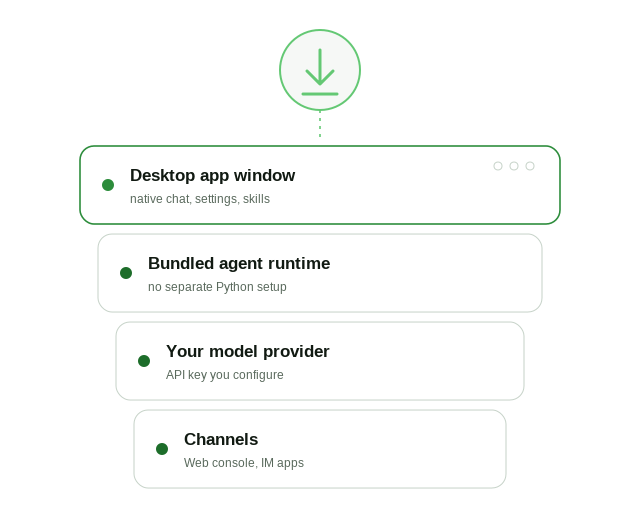
The button below fetches the latest Windows desktop build from cowagent.ai, the download site linked in the CowAgent README. The agent runtime is bundled, so you can launch it without installing Python.

This build
Windows desktop client
Also available
macOS, installer, Docker
Licence
MIT, open source
Illustration of the layers in the CowAgent desktop client: app window, bundled agent runtime, your model provider and channels

Release information

A fast-moving release line

Latest in the changelog

v2.2.1

Released
14 October 2026
Highlights
Artifacts center, custom menu, open Agent Chat API, prompt caching
Upgrade
cow update or the desktop one-click update

Taken from the project's changelog when this guide was written. Check GitHub Releases for anything newer.

  1. v2.2.1

    Artifacts center and custom menu, an open Agent Chat API, prompt caching to reduce context cost, plus tool, channel and security improvements.

  2. v2.2.0

    New Capabilities center for tools, MCP and skills, better multi-agent collaboration and a rebuilt web console.

  3. v2.1.8

    Multi-agent teams, manually created scheduled tasks and context-usage visualisation.

  4. v2.1.3

    First desktop client for macOS and Windows, knowledge-base document management and on-demand MCP tool retrieval.

  5. v2.1.0

    Internationalisation and new Telegram, Discord, Slack and WeChat Customer Service channels.

Installation & setup

Three documented ways to get started

Pick the route that matches your machine. Each one ends at the same place: a running agent you manage from the web console or the desktop app.

The quickest start

The desktop client bundles the agent runtime, so there is nothing else to install. Updates are checked automatically and applied with one click.

  1. Download the build from the Download section.
  2. Install and launch it, then follow the first-run onboarding.
  3. Open Models, choose a provider and paste your API key.
  4. Chat in the app, or connect a channel by scanning its QR code.

A background service you control

The installer handles dependencies, writes the configuration and starts the service. Then open http://localhost:9899 to reach the web console.

Linux / macOS
bash <(curl -fsSL https://cdn.link-ai.tech/code/cow/run.sh)
Windows PowerShell
irm https://cdn.link-ai.tech/code/cow/run.ps1 | iex

Containerised

Run CowAgent without installing Python or cloning the source. On a server, set web_host to 0.0.0.0, set web_password and open port 9899.

Docker Compose
curl -O https://cdn.link-ai.tech/code/cow/docker-compose.yml
docker compose up -d

Manage it with the cow CLI

Available after an installer or source install.

cow start | stop | restart
Control the background service.
cow status | logs
Check health and read logs.
cow update
Pull the latest code and restart.
cow skill install <name>
Install a skill from the terminal.
cow install-browser
Add browser automation (Playwright and Chromium).
/skill list
List installed skills from inside a chat.

Troubleshooting

Common problems and where to look first

Work from the inside out: service, console, model, channel. For the full checklist, read the troubleshooting guide.

01

The console does not open at localhost:9899

Check the service with cow status and read cow logs for start-up errors. Make sure nothing else is using port 9899.

02

It works locally but not from another device

Set web_host to 0.0.0.0, set a web_password, and open port 9899 in the firewall or security group.

03

The console password is rejected

Compare it with web_password in the config the running instance uses, then run cow restart. Cloud templates use the password set at deployment.

04

The agent answers with model errors

Re-check the API key, endpoint and model name on the Models page. Fallback models let the agent switch provider when one fails.

05

Browser tasks fail

Run cow install-browser, which installs Playwright and Chromium for browser automation.

06

An MCP tool is never used

Saving an MCP server in Capabilities checks the connection and lists its tools; retrieval diagnostics show how tools were ranked.

07

Token costs climb quickly

Agent mode sends more context than chat. Pick a cost-balanced model, run /compact on long sessions and watch usage.

FAQ

Questions people ask about CowAgent

Twenty answers in two groups. Use the arrow keys to move between questions.

Getting started & access

Project basics, installs, login and updates

  1. CowAgent is an open-source AI assistant and agent harness. It plans multi-step tasks, calls tools and skills, keeps long-term memory and a personal knowledge base, and talks to you through the web console or chat apps. You connect it to the large language model provider of your choice.

  2. Yes. The project was previously called chatgpt-on-wechat and is now officially named CowAgent. The old GitHub address redirects to the new repository, and existing users can update their local remote with git remote set-url origin https://github.com/zhayujie/CowAgent.git.

  3. The repository is maintained under the GitHub account zhayujie, with contributions from a wider community credited in each release note. This website is an independent guide and is not run by the maintainers.

  4. The software is released under the MIT License, so you can run and modify it without a licence fee. Model usage is billed separately by whichever AI provider you connect, and agent-style tasks use noticeably more tokens than ordinary chat. A hosted runtime is offered separately by LinkAI under its own terms.

  5. A desktop client is available for macOS and Windows. Linux, macOS and Windows can also run CowAgent through the one-line installer or from source, and Docker Compose works anywhere Docker is installed. See the compatibility matrix above for the full picture.

  6. No. The desktop client bundles the full agent runtime, so it launches after installation without a separate Python setup. Python is only needed when you run CowAgent from source.

  7. Open http://localhost:9899 on the machine running CowAgent. If you deploy on a server, set web_host to 0.0.0.0, protect the console with web_password in config.json, and open port 9899 in your firewall. The password belongs to your own instance; there is no central CowAgent account.

  8. The source code, issue tracker and tagged releases live in the zhayujie/CowAgent repository. Release notes are published in English and Chinese, and the README is available in several languages.

  9. For an installer or source deployment, run cow update to pull the latest code and restart. The desktop client checks for new versions automatically and offers a one-click update.

  10. No. cowagent.org is an independent guide that explains the project and links to its download. It is not operated by, endorsed by or affiliated with the CowAgent maintainers. The project's README links to cowagent.ai and docs.cowagent.ai.

Models, channels & safety

Providers, chat platforms, skills and risk

  1. The README lists Claude, OpenAI, Gemini, DeepSeek, Qwen, GLM, Kimi, MiniMax, Doubao, ERNIE, MiMo, LinkAI and custom OpenAI-style endpoints, including local models or proxies. Chat, vision, image generation, speech and embeddings can each be routed to a different provider from the web console.

  2. Yes. DeepSeek is one of the documented providers, covering chat and vision. Add your DeepSeek API key on the Models page of the web console or desktop client, then pick the model. If you need image generation, speech or embeddings, route those capabilities to another provider that supports them.

  3. The documented channels are the Web console (default), Telegram, Slack, Discord, WeChat, Feishu / Lark, DingTalk, WeCom Bot, QQ, WeCom App, WeChat Customer Service and WeChat Official Account. A single agent can serve several of them at the same time.

  4. Several WeChat-family channels are documented: WeChat, WeCom Bot, WeCom App, WeChat Customer Service and WeChat Official Account. Each has its own setup requirements and platform rules, so read the channel guide for the one you plan to use.

  5. Wechaty is a separate open-source chatbot SDK. The channel table in the current CowAgent README does not list a Wechaty channel, so treat older tutorials that mention it with care and follow the current channel documentation instead.

  6. Both are open-source, self-hosted agent runtimes that work through chat apps. CowAgent is written in Python, ships a desktop client for macOS and Windows and has deep coverage of Chinese workplace platforms. OpenClaw is built on Node.js and centres on a long-running gateway process. CowAgent can also install skills from ClawHub, the OpenClaw skill registry.

  7. Skills are higher-level workflows, defined by a manifest file, that combine several tools to complete a task. You can install them from Cow Skill Hub, GitHub, ClawHub, a URL or an uploaded archive, or have the agent write one through conversation. Skills are previewed before installation.

  8. Yes. MCP servers can be added in the Capabilities area of the console using stdio, SSE or Streamable HTTP transports. Saving checks the connection and lists the server's tools, and relevant MCP tools can be retrieved on demand to keep context small.

  9. The agent can read and write files, run terminal commands and drive a browser, so the maintainers advise deploying it only in trusted environments. Use a strong console password, review skills before you install them, keep the console off the public internet unless it is protected, and only download builds from the project's own sources.

  10. Planning, tool calls and memory retrieval send more context to the model than a single chat reply. Choose a model that balances quality and cost, compact long conversations with /compact, and keep an eye on your provider's usage dashboard.